BEGIN:VCALENDAR
VERSION:2.0
PRODID:-//ChamberMaster//Event Calendar 2.0//EN
METHOD:PUBLISH
X-PUBLISHED-TTL:P1H
REFRESH-INTERVAL:P1H
CALSCALE:GREGORIAN
BEGIN:VTIMEZONE
TZID:America/Denver
BEGIN:DAYLIGHT
RRULE:FREQ=YEARLY;BYMONTH=3;BYDAY=2SU
DTSTART:20070101T000000
TZOFFSETFROM:-0700
TZOFFSETTO:-0600
TZNAME:Mountain Daylight Time
END:DAYLIGHT
BEGIN:STANDARD
RRULE:FREQ=YEARLY;BYMONTH=11;BYDAY=1SU
DTSTART:20070101T000000
TZOFFSETFROM:-0600
TZOFFSETTO:-0700
TZNAME:Mountain Standard Time
END:STANDARD
END:VTIMEZONE
BEGIN:VEVENT
DTSTART;TZID=America/Denver:20261027T093000
DTEND;TZID=America/Denver:20261027T113000
X-MICROSOFT-CDO-ALLDAYEVENT:FALSE
SUMMARY:Bluebeam Max Mini-Camp - October 27\, 29
DESCRIPTION:ABOUT THE COURSE:The Bluebeam Max Mini-Camp is an immersive\, hands-on training experience designed to help construction professionals harness the full power of Bluebeam Max\, including AI-assisted reviews\, intelligent markup automation\, sheet stitching\, and natural-language interaction with PDFs using Claude AI.Through two highly impactful 2-hour live sessions\, participants will learn how to transform traditional PDF workflows into intelligent project management systems that accelerate reviews\, improve coordination\, and uncover issues before they become costly field problems.What Makes Bluebeam Max Different?Bluebeam Max introduces advanced AI-powered capabilities that fundamentally change how teams interact with drawings\, specifications\, and project documentation.Participants will gain exposure to innovative workflows including:Claude AI Integration "Talk to your PDFs" using natural-language prompts to summarize specifications\, identify scope gaps\, search markup data\, and automate repetitive tasksSheet Stitching Automatically combine multiple drawing sheets into one continuous navigable view for large-scale project coordinationSmart Review AI-assisted document review that helps identify discrepancies\, design conflicts\, and coordination issues earlySmart Overlay Intelligent drawing comparison tools that detect revisions and scope changes across sheets and project phasesMagic Markups Advanced markup automation tools including duplicate\, convert\, and offset capabilities that dramatically reduce repetitive clicksConnected Workflows Better coordination between 2D PDFs\, BIM workflows\, Studio Sessions\, and field collaboration tools\nWHO SHOULD ATTEND:This mini-camp is ideal for project managers\, project engineers\, estimators\, superintendents\, BIM/VDC professionals\, coordinators\, and operations leaders seeking practical\, real-world applications of AI inside construction document workflows.\nTHE INSTRUCTOR:Dan Rondinelli is a commercial construction professional with 35 years of project experience and a longtime CSU instructor specializing in plan reading\, quantity takeoff\, and estimating. A Class A licensed contractor and Certified Cost Professional\, he's a lifelong learner who enjoys sharing his expertise and time in his wood shop with others.
X-ALT-DESC;FMTTYPE=text/html:ABOUT THE COURSE:
The Bluebeam Max Mini-Camp is an immersive\, hands-on training experience designed to help construction professionals harness the full power of Bluebeam Max\, including AI-assisted reviews\, intelligent markup automation\, sheet stitching\, and natural-language interaction with PDFs using Claude AI.
Through two highly impactful 2-hour live sessions\, participants will learn how to transform traditional PDF workflows into intelligent project management systems that accelerate reviews\, improve coordination\, and uncover issues before they become costly field problems.
What Makes Bluebeam Max Different?
Bluebeam Max introduces advanced AI-powered capabilities that fundamentally change how teams interact with drawings\, specifications\, and project documentation.
Participants will gain exposure to innovative workflows including:
Claude AI Integration &mdash\; &ldquo\;Talk to your PDFs&rdquo\; using natural-language prompts to summarize specifications\, identify scope gaps\, search markup data\, and automate repetitive tasks
Sheet Stitching &mdash\; Automatically combine multiple drawing sheets into one continuous navigable view for large-scale project coordination
Smart Review &mdash\; AI-assisted document review that helps identify discrepancies\, design conflicts\, and coordination issues early
Smart Overlay &mdash\; Intelligent drawing comparison tools that detect revisions and scope changes across sheets and project phases
Magic Markups &mdash\; Advanced markup automation tools including duplicate\, convert\, and offset capabilities that dramatically reduce repetitive clicks
Connected Workflows &mdash\; Better coordination between 2D PDFs\, BIM workflows\, Studio Sessions\, and field collaboration tools
WHO SHOULD ATTEND:
This mini-camp is ideal for project managers\, project engineers\, estimators\, superintendents\, BIM/VDC professionals\, coordinators\, and operations leaders seeking practical\, real-world applications of AI inside construction document workflows.
THE INSTRUCTOR:
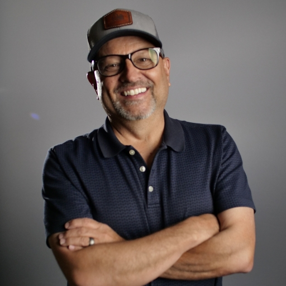
Dan Rondinelli is a commercial construction professional with 35 years of project experience and a longtime CSU instructor specializing in plan reading\, quantity takeoff\, and estimating. A Class A licensed contractor and Certified Cost Professional\, he&rsquo\;s a lifelong learner who enjoys sharing his expertise&mdash\;and time in his wood shop&mdash\;with others.
LOCATION:
UID:e.4265.1488054
SEQUENCE:3
DTSTAMP:20260622T213317Z
URL:https://members.agccolorado.org/meetings-calendar/Details/bluebeam-max-mini-camp-october-27-29-1764457?sourceTypeId=Hub
END:VEVENT
END:VCALENDAR